8.3 Restart, summarize or persist
- Status
- stable
- Owner
- Panaversity
- Approved
- Panaversity ·
In everyday life. Think of moving a long group chat into a new one. You can just start the new one (restart), post a short summary first (summarize), or pin the group's rules where everyone sees them (persist).
What you will learn. What to do when a conversation grows long: start again, carry a checked summary forward, or move what must last to its right place. You practice it in step 1 of the build step.
Why it matters. If you do not choose, the product condenses the chat for you, and you cannot tell which details it drops.
When a conversation with an AI Worker grows long, you have three moves, or choices. Choose by what you need to keep. In the table, a project is a workspace in an AI product that holds a worker's instructions and files. Memory is what the AI product remembers about you from past chats. A project can keep its own memory, called project memory.
| Move | When | How |
|---|---|---|
| Restart | The task is done, or none of the history is needed | Start a new conversation in the same project. The project's instructions and knowledge come with it. The old chat's turns, its messages and replies, do not come with it. But project memory may still carry what it learned from them |
| Summarize | The task continues, but the history is long | Ask the worker for a handover note, a short summary for the next conversation: decisions made, open items (work not yet finished), files in use, rules agreed. Read the note and correct it. Start the next conversation from it |
| Persist | Something must last beyond this conversation | Move it out of the chat, into the place where that kind of information belongs (see the list below) |
To summarize, you can ask: "Write a handover note for a new conversation, with the decisions made, the open items, the files in use and the rules we agreed."
Where to persist each kind of information:
- A standing rule, one meant for every conversation, goes into the project instructions. Maria's rule below is one.
- Approved knowledge goes into KSoR, the Knowledge System of Record, where the company keeps what it has approved as true.
- A preference, such as "reply in plain English," can go into memory.
- The history of one matter, one piece of work such as an invoice, goes into SSoR, the State System of Record. It is the matter's case file.
Current state, where things stand now, is not persisted. It stays in the system that holds it, such as the accounting system. A dated snapshot, a copy of the state with its date, is evidence of what was true then. Recheck the system before a decision.
Two warnings.
- A summary is the worker's output. Review the summary as you review any other output, because a rule the summary drops, or leaves out, stays dropped.
- A restart may not cut the new conversation off from old ones, because project memory may still carry what it learned from them. If a detour, an old side topic, keeps coming back in a new conversation:
- Find the earlier chat that carries it.
- Delete that chat, or move it out of the project.
- Then delete any memory saved from it, if the product shows it.
For a matter that runs for days, its SSoR record makes a better handover than a summary. It is not kept in any chat.
At Brightline, the book's example company, the AP Worker is the AI Worker that handles the bills Brightline owes. Early in a long conversation, Maria, the office manager, told it to "always flag Northern Maple to Dave." That meant pointing out Northern Maple's invoices to Dave, the controller. After the conversation was condensed, the worker stopped following that instruction.
The fix is to persist. Maria wanted Northern Maple, a supplier, flagged because its invoices come in Canadian dollars. So she writes the rule she meant: "Flag every invoice not in USD to Dave." USD means US dollars. It goes into the project instructions, where it loads with every conversation. Maria also asks Dave whether the rule should become policy.
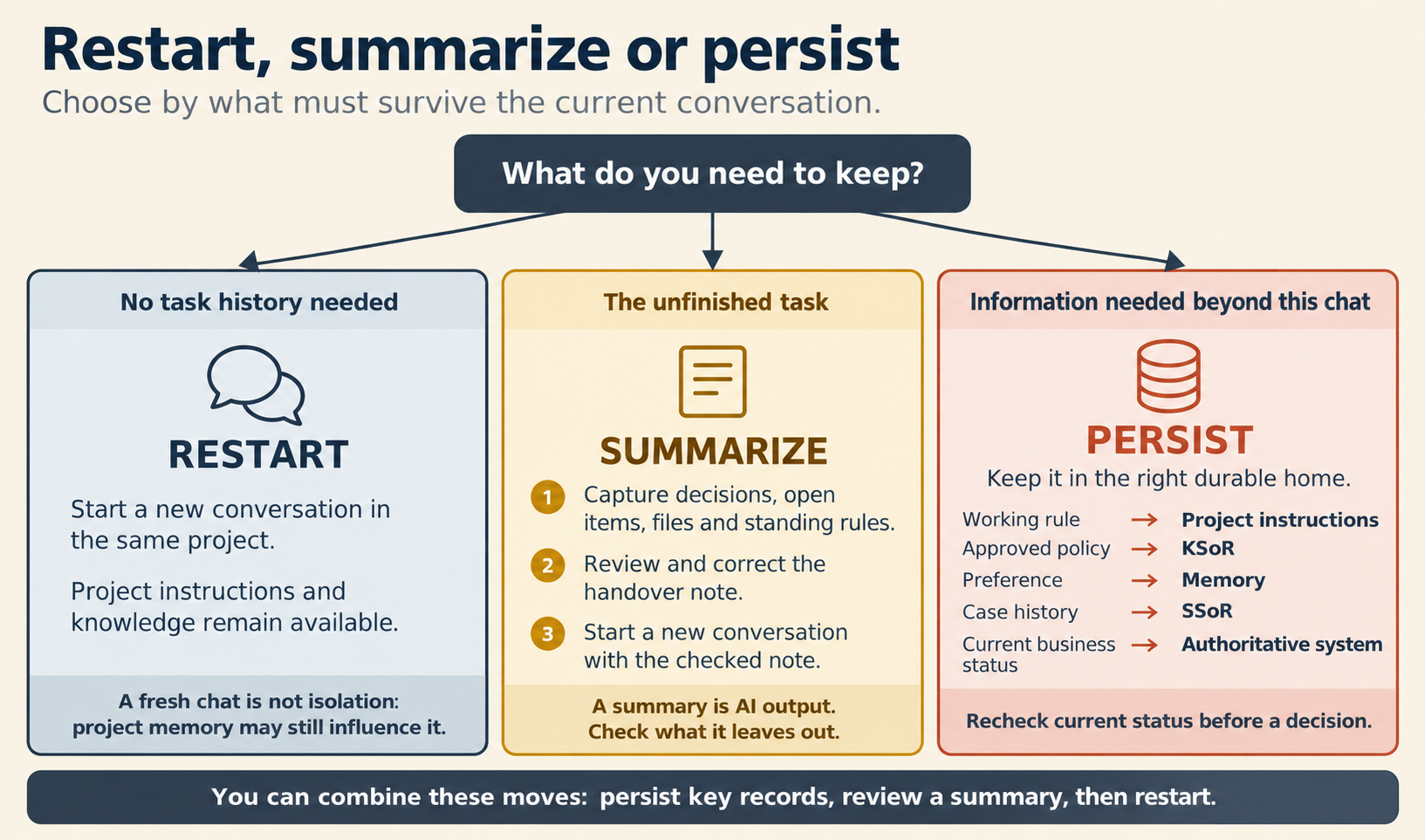
Figure 8.4. Restart, summarize or persist. You can also combine them: persist what must last, review a summary, then restart.
Check yourself
Question 1 / 8 · blueprint
0 answered
The task is finished and tomorrow brings a new batch. Which move?
8.2 Context: what the worker sees now
What an AI Worker can use when it writes its next reply, why a long conversation loses details, and why a bigger window does not solve it.
8.4 Memory and SSoR
What an AI product remembers about you, what it must never be trusted with, and the separate record that remembers one piece of work.