8.5 Configure the workspace: instructions, knowledge and connectors
- Status
- stable
- Owner
- Panaversity
- Approved
- Panaversity ·
In everyday life. Think of a shared kitchen. There are house rules on the fridge for everyone, your own labels on your shelf, and a recipe card for tonight's dinner. Old recipe cards left in the drawer still get used.
What you will learn. How to set up the workspace an AI Worker answers from: its standing instructions, its files and its connectors, and how to keep each one current. You practice it in steps 3 and 5 of the build step.
Why it matters. Everything in that workspace can become an answer. Set up without care, it answers from old or unapproved files.
A project is a workspace in an AI product for one body of work, such as the work of one AI Worker. Every conversation started in it begins already briefed, with the project's setup in place.1 It holds three kinds of configuration, or setup.
Instructions. Standing instructions are rules that load with every conversation. Depending on the product, they come at up to three levels, each with its own job:
- Organization instructions hold company rules for everyone in the organization.
- Your account instructions say how you work: your personal preferences.
- Project instructions give this worker's role, its sources (where its information comes from) and its limits.
On top of these, a brief still sets each task. A brief is the written instructions for one task, from Chapter 5.
Knowledge. Files you add to a project are available to every conversation in it. Two warnings apply:
- An uploaded file is a copy, frozen at the moment you uploaded it. When the original changes, the copy does not.
- Every file you add is a possible answer: the worker may answer from it. At Brightline, the book's example company, a project held old onboarding notes for new staff beside the approved policy. The notes did not need to be wrong everywhere to do harm. They only needed to be there: the worker answered a question about a supplier's bank details from them.
Connectors. A connector lets the worker reach a source in the place where it is kept, such as a shared drive, with your own permissions.1 Reaching a source does not make its content approved, and what the worker finds there is not proof that it is current. A connected folder of drafts still holds only drafts.
Knowledge reaches a project by one of three routes, and each needs its own kind of update after its owner, the person responsible for it, approves a change:
| Route | What to do after a change |
|---|---|
| Uploaded copy | Replace it |
| Fetched when asked: a connector gets the file each time it is needed | Check that answers name the new approval as their source |
| Synced or indexed: the product refreshes its copy, or prepares the file for search | Check that the sync ran |
Upload knowledge that must be exactly what its owner approved. Use the other routes only for a source that holds nothing but approved content. Then manage what is connected:
- Scope it. Point the connector at the smallest folder or file that the work needs. It sees what your account sees, which may be more than this work needs.
- Review it. Check what is connected whenever you review the project, and remove any connector the work no longer uses.
Two words from KSoR, the Knowledge System of Record, come up in the lines below. KSoR is how a company keeps the knowledge it has approved. A concept is a short file that holds the rules for one topic. A concept marked stable has been approved.
Good project instructions for a worker that answers from governed knowledge, approved concepts like these, say six things. Here they are for the AP Worker at Brightline, the AI Worker that handles the bills Brightline owes. AP means accounts payable. In each quoted line, "you" means the worker.
- Role. "You answer AP policy questions for Brightline's AP team."
- What counts as authority. "Policy answers come only from the concept files in this project, each marked stable. Nothing else in the project, your memory or general knowledge counts as Brightline policy." Memory is what the AI product remembers from past chats.
- Cite. "Name the concept title and its approval date for every policy claim." The approval date shows which approved text the answer used.
- Abstain. "If the concepts do not answer the question, say so and name who decides. Do not fill the gap."
- State. "You cannot see current payment or vendor status. If an SSoR record covers the matter, give its latest-known status, with its date and source, and say it is not verified current. For current status, point to the accounting system or to Maria." State here means current status. An SSoR record is the case file of one matter, such as one invoice, and Maria is Brightline's office manager.
- Conflicts. "If memory or any file disagrees with a concept, the concept wins. Say that there was a conflict."
The instructions do not repeat the policy. The policy is kept in one place, and the instructions point to it, as line 2 does.
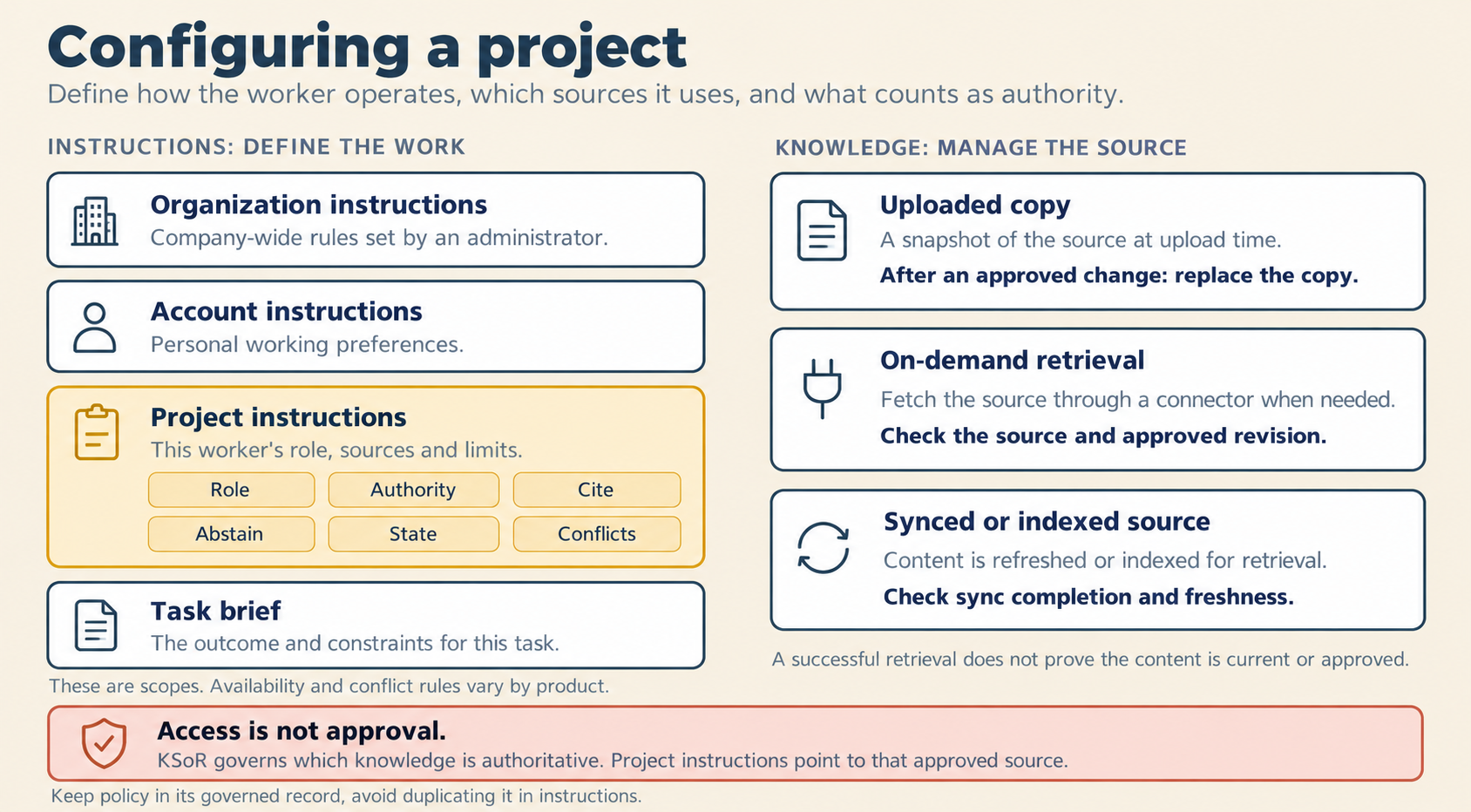
Figure 8.6. Configuring a project: the instructions on the left, and the three routes for knowledge on the right.
Check yourself
Question 1 / 9 · blueprint
0 answered
Which level of instructions should carry this worker's role, sources and limits?
Sources
8.4 Memory and SSoR
What an AI product remembers about you, what it must never be trusted with, and the separate record that remembers one piece of work.
8.6 KSoR: what is officially true
How a company keeps the rules it has approved: each rule written once, an approval that is recorded, and three statuses a rule can have.