8.2 Context: what the worker sees now
- Status
- stable
- Owner
- Panaversity
- Approved
- Panaversity ·
In everyday life. Think of a whiteboard in a meeting room. As the meeting goes on, someone erases the oldest notes to make room, and writes a short summary of them in one corner.
What you will learn. What an AI Worker can use when it writes a reply, and why a long conversation loses details. You practice it in steps 1 and 3 of the build step.
Why it matters. What the worker cannot see, it does not know. A rule you gave early in a long chat can be lost, and nothing warns you.
An AI Worker has a whiteboard too. The context window is everything the model, the AI the worker runs on, can use when it writes its next reply. It holds:
- your message
- the standing instructions, the rules set for every conversation
- any files or knowledge loaded for this turn, that is, for this message and its reply
- what memory supplied: what the AI product remembers about you from past chats
- results from tools, such as a search of the project's files
- the conversation so far, or a summary of its older parts
It is measured in tokens, which are pieces of words. And it has a limit.
Three facts follow from that.
Everything competes for the same space. A long document, a long conversation and a large spreadsheet all take up room.
Long conversations get condensed. AI products handle the limit differently. A common solution is to summarize earlier messages, so the conversation can keep going. A summary is shorter than what it replaces. Some details are lost from it, and nothing tells you which ones. That is what happened at Brightline, the book's example company. Early in a long conversation, Maria, the office manager, told the worker to "always flag Northern Maple to Dave." That meant pointing out invoices from Northern Maple, a supplier, to Dave, the controller. She gave that instruction only in the chat. Weeks later, the conversation had been condensed, and the worker no longer followed it.
Some products keep the full history, so the worker can look back. But you do not control whether it looks back on any one turn.
Nothing outside the window exists for the worker. If a rule is not in the window this turn, and the worker cannot fetch it into the window, the worker does not know it. A bigger window delays the problem, because a long enough conversation still fills it. It does not remove it. Figure 8.3 shows where to keep what must last.
A conversation can lose things, and files keep them. This book's first edition makes the same point in its fifth principle, Persisting State in Files: the conversation is volatile, and the filesystem is durable.1
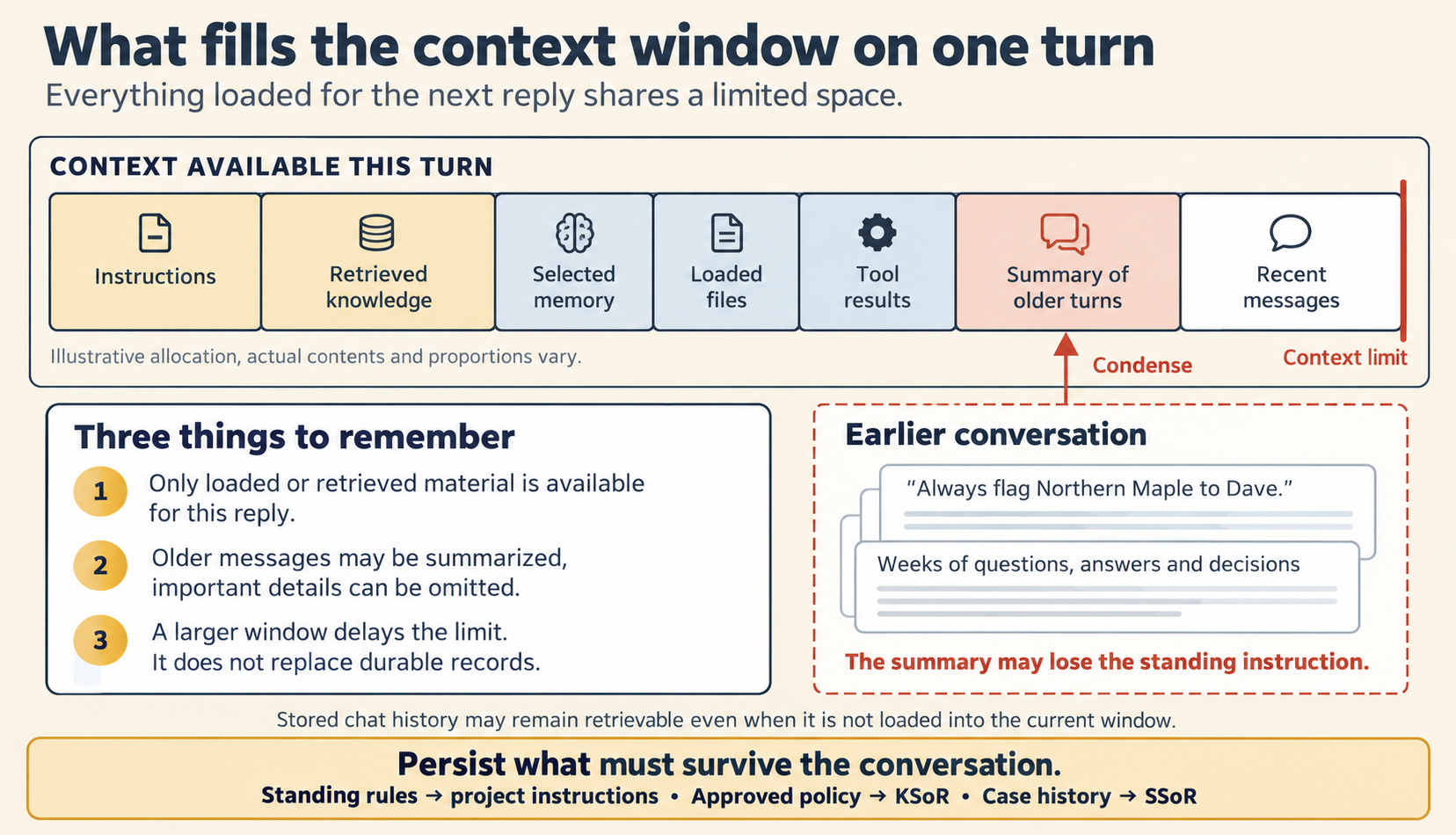
Figure 8.3. What fills the context window on one turn.
Check yourself
Question 1 / 7 · blueprint
0 answered
What is the context window?
Sources
8.1 Five places an answer comes from
Where an AI Worker's answer can come from, the question each source answers, and which sources may decide a question about a rule or about a payment.
8.3 Restart, summarize or persist
Three ways to handle a long conversation with an AI Worker, chosen by what you need to keep, and where each kind of information belongs.