7.4 Permissions set the blast radius
- Status
- stable
- Owner
- Panaversity
- Approved
- Panaversity ·
In everyday life. You lend a friend your car to pick up groceries. But you also left your house keys and your garage door opener on the same key ring.
The blast radius is everything an AI Worker could affect if it went wrong: every connector to another app, every tool that can change things, every folder, every signed-in site and every person it can message. Permissions, the product settings for the worker's tools, set it. The envelope, the written limit on what the worker may do, does not. A rule in a brief, the written instructions for one task, is something the worker will usually follow. A permission that is switched off is a limit that it cannot cross. So permissions decide the worst case.
Three rules keep the blast radius inside the envelope.
Grant what the task needs. Turn on only the connectors this task uses. Read tools, which only look, can be on. Write tools, which change or send things, stay off until an action reaches execute, the rung where the worker acts itself. A tool that only saves a draft for a person to send can be on.
Make "can" no wider than "may." What the tools can do must be no wider than what the envelope says the worker may do. Where the envelope says draft, the worker only prepares the email. The send tool is off, and a person sends. A send tool that asks first is execute with approval, which is a different line in the envelope. So if you want it, change the envelope first. Where no setting can enforce a line, write it on a gap list and keep that action yourself. A gap list is honest. A setting that only looks right is not.
Know whose name it acts in. In Part II the worker acts through your accounts, so other systems record its actions as yours. That is why, in this chapter's story, the accounting system logged the worker's change under the login of Maria, the office manager. A production worker, one in real daily use, needs its own identity (Chapters 22 and 27).
Settings that skip approvals, such as a fully automatic mode or "always allow" on a write tool, widen the blast radius for every task. Who may switch them on is a company policy decision (Chapter 10).
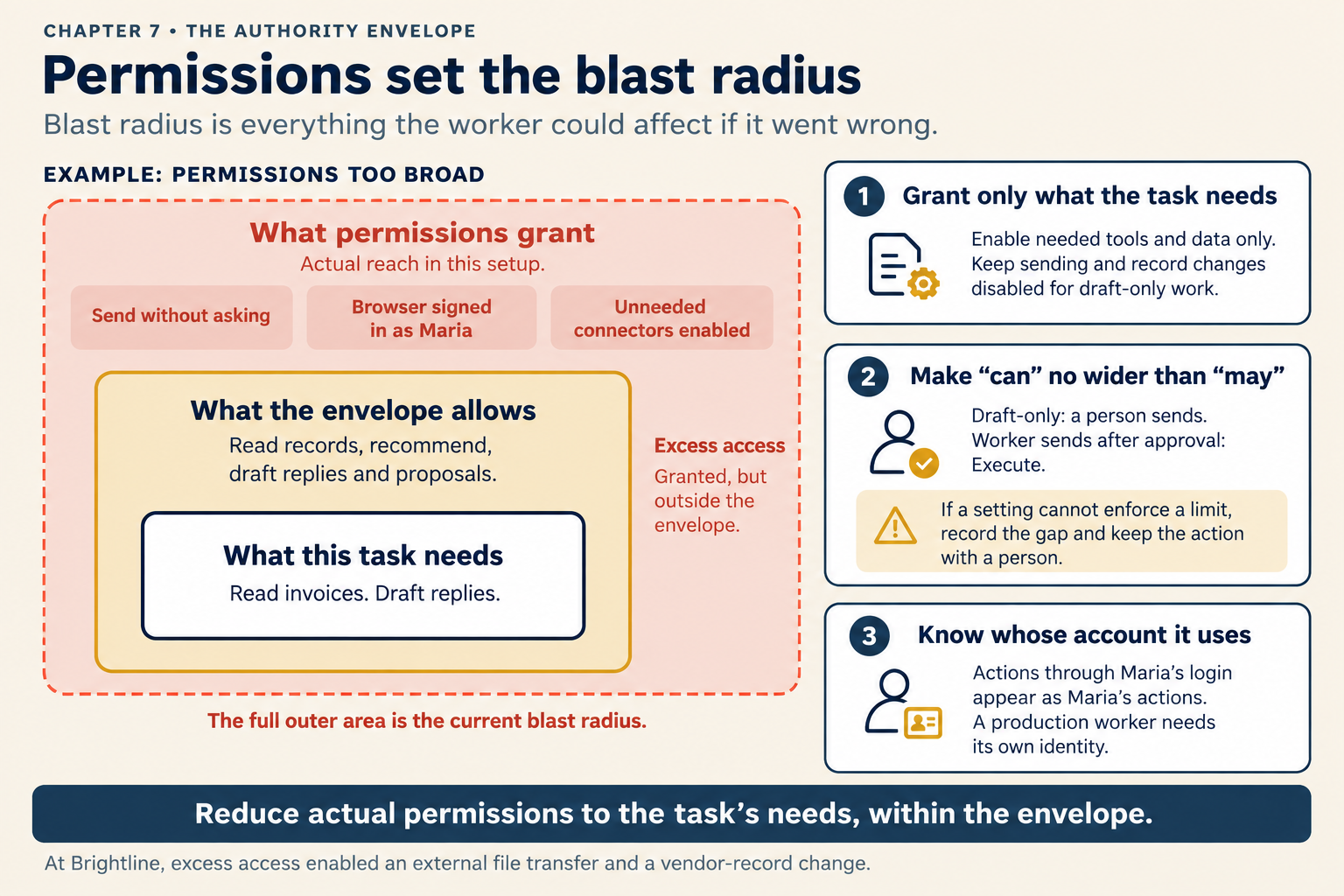
Figure 7.4. When permissions grant more than the envelope allows, the difference is blast radius nobody chose.
Check yourself
Question 1 / 8 · current
0 answered
What is a worker's blast radius?
7.3 Choose the rung: reversibility, familiarity, exposure
Three questions that set how far a worker may go with each action, how to combine their answers, and when the level may rise or must fall.
7.5 Prefer connectors to browsers, and browsers to screen control
Three ways a worker can reach a system, how they differ in reach, record and control, and which to choose.